
Anúncios
Choosing the right WiFi network can transform your daily digital experience, boosting speed, stability, and overall connectivity quality for all your online activities.


In our hyper-connected world, WiFi quality has become as essential as electricity or running water. Whether you’re working from home, streaming your favorite shows, or simply browsing social media, the performance of your wireless network directly impacts your productivity and satisfaction.
Anúncios
Yet many people simply connect to the strongest signal without considering other critical factors that determine true network quality.
Understanding how to analyze and compare WiFi networks around you empowers you to make informed decisions about connectivity.
Anúncios
This knowledge helps you avoid frustrating slowdowns, connection drops, and security vulnerabilities that plague poorly configured or overcrowded networks. Let’s explore the essential tools and techniques that will help you identify the best performing WiFi options in your environment.
🔍 Why WiFi Quality Analysis Matters More Than Ever
The digital landscape has evolved dramatically over the past few years. Remote work, online education, telemedicine, and cloud-based services have made reliable internet connectivity non-negotiable. A weak or unstable WiFi connection doesn’t just cause minor inconveniences anymore—it can disrupt critical work meetings, interrupt educational sessions, or prevent access to essential services.
Beyond speed considerations, WiFi quality encompasses several interconnected factors. Signal strength, channel congestion, interference patterns, security protocols, and network configuration all play crucial roles in determining your actual user experience. A network showing five bars of signal strength might still perform poorly if it’s operating on an overcrowded channel or using outdated security standards.
Environmental factors also significantly impact WiFi performance. Physical obstacles like walls, floors, and large metal objects can weaken signals. Electronic devices such as microwaves, baby monitors, and Bluetooth gadgets create interference. Even the number of connected devices sharing bandwidth affects everyone’s experience on the network.
📊 Key Metrics That Define WiFi Network Performance
When evaluating WiFi networks, several technical measurements provide insight into potential performance. Understanding these metrics helps you move beyond simple signal bars to make data-driven connectivity decisions.
Signal Strength and RSSI Values
Received Signal Strength Indicator (RSSI) measures the power level your device receives from a WiFi access point. Typically expressed in negative decibels (dBm), these values range from -30 dBm (excellent) to -90 dBm (unusable). A strong signal above -50 dBm generally provides optimal performance for most applications.
However, signal strength alone doesn’t guarantee good performance. A powerful signal from a heavily congested network or one with poor backhaul connectivity will still deliver disappointing results. Think of it like having a wide highway entrance but only a narrow single-lane road beyond—the bottleneck limits overall throughput regardless of initial capacity.
Channel Utilization and Congestion
WiFi networks operate on specific channels within designated frequency bands. The 2.4 GHz band offers 11 overlapping channels (in most regions), while the 5 GHz band provides many more non-overlapping options. When multiple networks operate on the same channel, they compete for airtime, reducing available bandwidth for everyone.
Channel congestion represents one of the most common yet overlooked causes of poor WiFi performance, especially in dense urban environments. Apartment buildings, office complexes, and commercial districts often feature dozens of competing networks, creating significant interference patterns that degrade everyone’s connectivity.
Frequency Bands: Understanding 2.4 GHz vs 5 GHz
The 2.4 GHz frequency band offers better range and wall penetration but provides slower maximum speeds and suffers from more interference due to widespread use by various devices. This band works well for larger spaces or when you need connectivity through multiple walls, but expect more competition from neighboring networks.
The 5 GHz band delivers faster speeds with less interference but offers reduced range and weaker penetration through physical obstacles. Modern routers often support both bands simultaneously (dual-band), and the newest devices also support 6 GHz (WiFi 6E), providing even more capacity and less congestion for compatible hardware.
🛠️ Essential Tools for Analyzing WiFi Networks
Professional-grade WiFi analysis once required expensive specialized equipment. Today, sophisticated smartphone applications put comprehensive network analysis capabilities in everyone’s pocket, democratizing access to insights previously available only to IT professionals.
Mobile WiFi Analyzer Applications
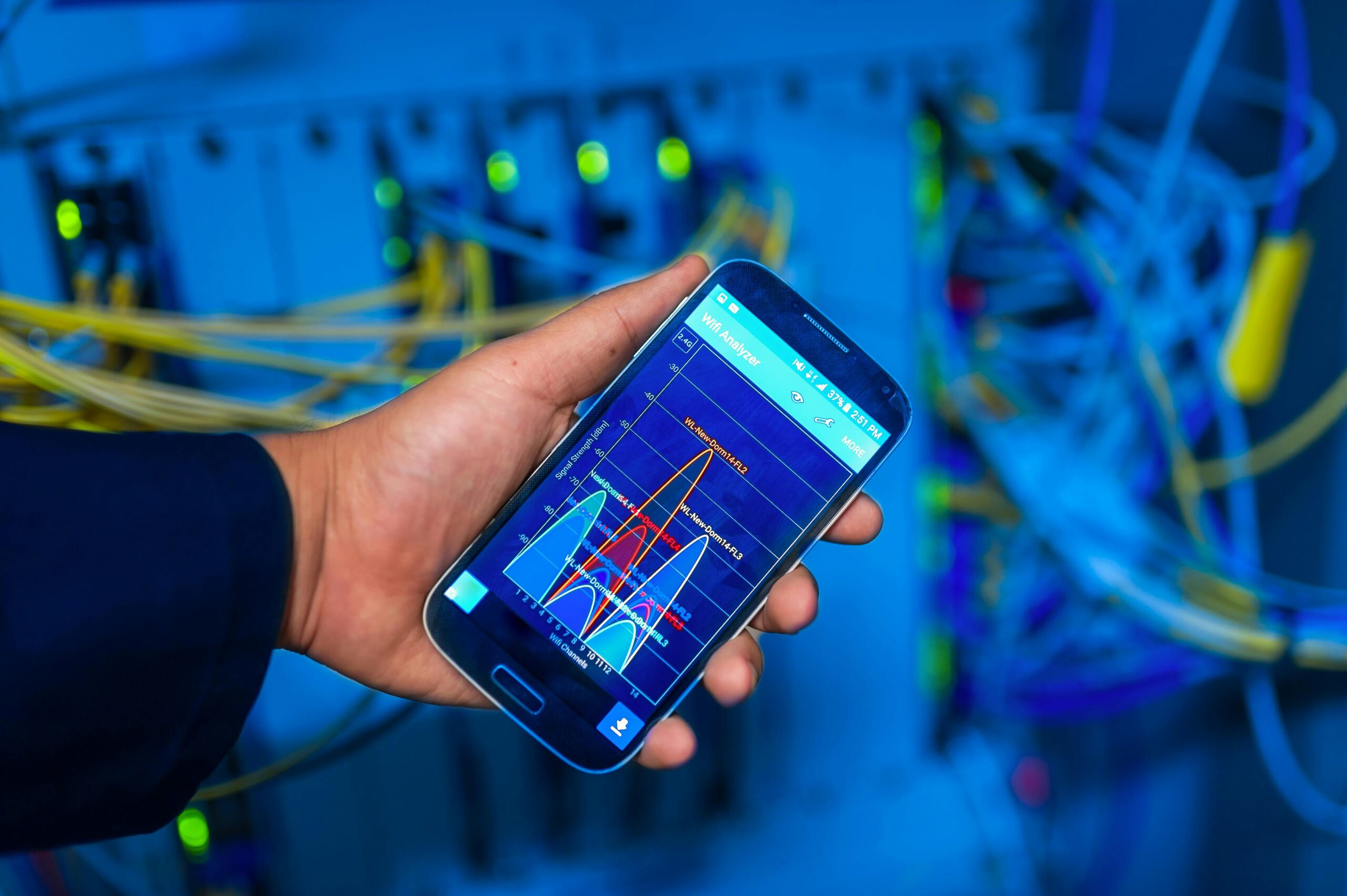
Dedicated WiFi analyzer apps transform your smartphone into a powerful network diagnostic tool. These applications scan available networks, measure signal strength across different locations, identify channel congestion, and visualize interference patterns through intuitive graphs and charts.
Quality analyzer apps display critical information including:
- Real-time signal strength measurements for all detected networks
- Channel allocation showing which networks compete for spectrum
- Security protocol identification (WPA3, WPA2, WEP, or open networks)
- Network frequency band and channel width information
- Access point manufacturer identification through MAC address lookup
- Historical tracking showing signal strength changes over time
Built-in Operating System Tools
Both Windows and macOS include native utilities that provide basic WiFi information. Windows users can access network details through command prompt using “netsh wlan show networks mode=bssid” for detailed information about available networks, including signal strength, channel, and encryption type.
Mac users can access hidden WiFi diagnostics by holding the Option key while clicking the WiFi icon in the menu bar. This reveals detailed connection information including transmit rate, RSSI, noise levels, and channel information—valuable data for troubleshooting and optimization.
🎯 Step-by-Step Guide to Evaluating Available Networks
Systematic analysis produces more reliable results than casual observation. Following a structured evaluation process helps you gather comprehensive data about network performance across different conditions and time periods.
Conducting a Comprehensive Site Survey
Begin by mapping signal strength throughout the areas where you’ll actually use your devices. Walk through different rooms or zones while monitoring signal levels from various networks. Physical movement often reveals dramatic strength variations due to obstacles, distance, and interference patterns.
Document your findings by noting which networks maintain strong, consistent signals across your entire usage area. Networks showing significant fluctuation might cause connection instability even if they occasionally display excellent signal strength in specific locations.
Testing During Peak and Off-Peak Hours
Network performance varies significantly throughout the day as usage patterns change. A network providing excellent speeds during midday might become frustratingly slow during evening hours when neighbors stream video content or participate in online gaming sessions.
Conduct speed tests at different times—morning, afternoon, evening, and late night—to understand performance patterns. This reveals whether available bandwidth remains consistent or degrades during high-demand periods. Consistent performance across different times indicates well-configured network infrastructure with adequate capacity.
Identifying Interference Sources and Patterns
Environmental interference significantly impacts WiFi quality but often goes unnoticed. Microwave ovens, cordless phones, baby monitors, and Bluetooth devices all operate in the 2.4 GHz spectrum, creating potential interference. Even physical movements near access points can temporarily affect signal quality.
Use your analyzer app to monitor signal quality while activating different household devices. Identifying interference sources helps you understand whether poor performance stems from network issues or environmental factors beyond the router’s control.
🔐 Security Considerations in Network Selection
Network performance means nothing if security vulnerabilities expose your data to interception or unauthorized access. Evaluating security protocols forms an essential component of comprehensive WiFi quality assessment.
Understanding WiFi Security Standards
Modern networks should implement WPA3 or at minimum WPA2 encryption protocols. These standards encrypt data transmitted between your device and the access point, preventing eavesdropping by nearby parties. Networks using outdated WEP encryption or no security at all expose all transmitted data to potential interception.
Open public networks without passwords pose particular risks despite their convenience. While useful for basic browsing, avoid accessing sensitive information like banking sites or entering passwords on unsecured networks. If you must use open networks, employ a VPN service to encrypt your traffic before it leaves your device.
Recognizing Rogue Networks and Security Threats
Malicious actors sometimes create fake access points mimicking legitimate networks to intercept user data. These “evil twin” attacks exploit user trust by broadcasting familiar network names, tricking devices into automatically connecting.
Always verify network authenticity before connecting, especially in public spaces. Legitimate business networks typically use consistent naming conventions and employ proper security protocols. Be suspicious of duplicate network names or unusually strong signals from networks that typically show weaker coverage in specific locations.
💡 Interpreting Analysis Results for Better Decisions
Collecting data represents just the first step—interpreting results correctly enables informed decision-making about network selection and optimization opportunities.
Creating Your Network Performance Baseline
Establish performance expectations based on your specific needs. Video streaming requires consistent bandwidth but tolerates some latency. Video conferencing demands both adequate bandwidth and low latency. Online gaming prioritizes minimal latency above high bandwidth. Cloud storage uploads benefit from strong upload speeds, often asymmetrical in residential connections.
Match available networks against your usage requirements rather than simply choosing the highest advertised speed. A slightly slower but more stable connection often delivers better real-world performance than a faster but inconsistent alternative.
Weighing Multiple Factors Simultaneously
Optimal network selection requires balancing competing priorities. Consider this comparison framework when evaluating options:
| Factor | High Priority For | Evaluation Method |
|---|---|---|
| Signal Strength | All users | RSSI above -60 dBm throughout usage area |
| Channel Congestion | Dense environments | Fewer than 3 networks on same channel |
| Security Protocol | Privacy-conscious users | WPA2 minimum, WPA3 preferred |
| Frequency Band | Speed vs range tradeoff | 5 GHz for speed, 2.4 GHz for coverage |
| Network Stability | Real-time applications | Consistent performance during peak hours |
🚀 Optimizing Your Own Network Based on Analysis
Understanding WiFi analysis principles benefits not just network selection but also optimization of networks you control. Apply analytical insights to improve your home or office WiFi performance.
Selecting Optimal Channels for Your Router
After analyzing surrounding networks, configure your router to operate on the least congested channel. In the 2.4 GHz band, channels 1, 6, and 11 don’t overlap with each other—choose whichever shows least competition from neighboring networks.
The 5 GHz band offers many more options. Modern routers with automatic channel selection typically perform well, but manual configuration based on analysis sometimes yields better results, especially in dense environments where automatic systems might not adapt quickly enough to changing conditions.
Strategic Access Point Placement
Router location dramatically impacts coverage quality. Central positioning within your space provides more balanced coverage than corner placement. Elevation improves signal distribution—mounting routers on walls or placing them on higher furniture typically outperforms floor-level installation.
Avoid positioning routers near large metal objects, inside cabinets, or adjacent to potential interference sources. Your WiFi analyzer reveals how repositioning affects signal distribution throughout your space, enabling data-driven placement decisions rather than guesswork.
📱 Leveraging Modern WiFi Standards and Technologies
Recent WiFi advancements introduce features that significantly improve performance and capacity. Understanding these technologies helps you identify networks offering superior connectivity options.
WiFi 6 and WiFi 6E Advantages
WiFi 6 (802.11ax) introduces efficiency improvements that enhance performance even in congested environments. Technologies like OFDMA allow routers to serve multiple devices simultaneously rather than sequentially, reducing latency and improving responsiveness for all connected users.
WiFi 6E extends these benefits into the 6 GHz band, providing pristine spectrum with minimal interference from legacy devices. Networks supporting these standards deliver noticeably better performance when multiple devices compete for bandwidth simultaneously.
Mesh Network Systems and Extended Coverage
Traditional single-router setups struggle to provide consistent coverage across larger spaces. Mesh WiFi systems employ multiple coordinated access points that seamlessly hand off connections as you move throughout the area, maintaining strong signals everywhere.
When analyzing available networks, mesh systems often appear as multiple access points with similar names operating on different channels. This distributed architecture typically provides more consistent performance across larger areas compared to traditional range extenders or single router deployments.
🌐 Real-World Application Scenarios and Solutions
Different environments present unique challenges requiring tailored approaches to WiFi analysis and optimization.
Apartment Living and Dense Urban Environments
Urban apartment dwellers face perhaps the most challenging WiFi environments, with dozens of competing networks creating severe congestion. Analysis becomes especially critical here—identifying less congested channels can dramatically improve performance even without upgrading hardware.
Consider the 5 GHz band primarily in these environments despite its reduced range. The abundance of available channels typically outweighs range limitations within apartment-sized spaces, and reduced interference delivers more consistent performance.
Large Homes and Multi-Story Buildings
Extensive coverage areas require strategic planning to maintain consistent quality throughout the space. Walk-through surveys using WiFi analyzers identify dead zones and weak coverage areas, informing decisions about additional access points or mesh system deployment.
Multi-story buildings present particular challenges as signals must penetrate floors in addition to walls. Vertical access point distribution—positioning units on different floors rather than clustering them—typically provides better coverage than trying to extend a single access point’s range across multiple levels.
Small Office and Home Office Setups
Professional use demands reliability above all else. Analyze not just signal strength but stability over time, especially during typical working hours. Connection drops during important video calls or slow performance when uploading large files to cloud storage can significantly impact productivity.
Consider separating professional and personal traffic through different network bands or even separate networks if your router supports it. This isolation ensures leisure activities don’t compete with work requirements for bandwidth and prevents casual browsing from introducing potential security vulnerabilities to professional devices.
🎓 Advanced Tips for Power Users
Taking your WiFi analysis skills to the next level unlocks additional optimization possibilities and deeper understanding of network behavior.
Understanding and Utilizing Network Bands Effectively
Modern dual-band routers offer “smart steering” features that automatically direct devices to optimal bands. However, manual band selection sometimes produces better results. Reserve the 5 GHz band for bandwidth-intensive activities like streaming and video conferencing while relegating less demanding devices to 2.4 GHz.
Some devices perform poorly with automatic band switching, experiencing brief disconnections during transitions. Stationary devices like smart TVs or desktop computers benefit from manual assignment to specific bands based on their location and performance requirements.
Leveraging Quality of Service (QoS) Settings
QoS configurations prioritize specific types of traffic or devices, ensuring critical applications receive necessary bandwidth even during network congestion. After identifying performance requirements through analysis, configure QoS to prioritize video conferencing, VoIP calls, or gaming traffic above less time-sensitive activities like downloads or updates.
Modern routers increasingly automate QoS management, but understanding traffic priorities helps you verify configurations align with your actual usage patterns rather than manufacturer defaults that might not match your specific needs.
🔄 Maintaining Long-Term Network Performance
WiFi quality isn’t static—environmental changes, new neighboring networks, and evolving usage patterns require periodic reassessment and adjustment.
Establishing Regular Analysis Routines
Schedule quarterly WiFi surveys to monitor performance trends and identify emerging issues before they become frustrating problems. Seasonal changes sometimes affect network behavior as temperature variations alter material properties affecting signal propagation.
Document your findings to establish historical baselines. Performance degradation often occurs gradually, making it difficult to recognize without comparative data. Historical records reveal whether current performance represents normal variation or genuine degradation requiring intervention.
Staying Current with Firmware and Updates
Router manufacturers regularly release firmware updates addressing security vulnerabilities, improving stability, and sometimes enhancing performance. Enable automatic updates when available or establish reminders to check manually on quarterly schedules.
Client device updates similarly impact WiFi performance. Operating system updates frequently include wireless driver improvements that enhance stability and compatibility with modern router features.
✨ Transforming Your Connectivity Experience
Mastering WiFi analysis empowers you to take control of your digital connectivity rather than accepting whatever performance your current setup happens to provide. The knowledge and tools discussed throughout this guide enable informed decisions whether selecting between available networks or optimizing ones you control.
Remember that optimal WiFi performance results from balancing multiple factors rather than maximizing any single metric. Strong signal strength matters little if severe congestion limits actual throughput. High advertised speeds mean nothing if unstable connections constantly interrupt your activities. Security vulnerabilities negate performance advantages by exposing your data to potential threats.
Approach WiFi analysis systematically, considering your specific usage requirements, environmental factors, and available options comprehensively. The investment of time in proper analysis and optimization pays ongoing dividends through improved productivity, reduced frustration, and enhanced digital experiences across all your connected activities.
Your connectivity deserves the same attention you give other important aspects of your digital life. With the insights and techniques covered here, you now possess the knowledge to ensure your WiFi performance meets your needs consistently, reliably, and securely. Take action today—analyze the networks around you and discover the connectivity improvements waiting to transform your online experience.
